Vinted is like an online second-hand flea market, primarily used for clothes. I like to buy from there, not just for the sustainability, but also because there are some genuinely unique pieces on there, mostly for an acceptable amount of schmeckles cash.
And while Vinted obviously has an algorithm, the best offers are often short-lived, and I don’t want to browse the site manually every day, since frankly, I have other things to do. So me being me, I built a fancy bot that does it for me and notifies me about clothes that match my taste to a tee.
I named it VSniper. Technically, the term sniping is often used with auction bots that bid at the very last few seconds to “snipe” the auction. Vinted doesn’t have auctions, so the term doesn’t really fit, but it still stuck.
What I actually needed
I needed some software that..
- searches the Vinted catalogue periodically
- lets me filter by clothing size and price
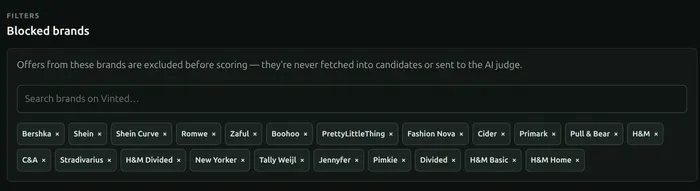
- lets me filter out some unsustainable brands I don’t like (looking at you, Shein and others)
- learns my taste profile from pictures of my current wardrobe
- judges all found listings using its pictures instead of just the listing title and description
- alerts me via Telegram if the score assigned to a listing passes a threshold
- updates my taste profile based on my feedback and comments on its suggestions
- runs all VLM processing on my CPU-only server to save on costs
Nothing too fancy! But this doesn’t seem to exist, so I built it.
Building a taste profile
Instead of trying to describe my niche taste in clothing just via text, I built a “wardrobe” view where I can upload some clothes I already own and add a note explaining what I especially like about each piece.
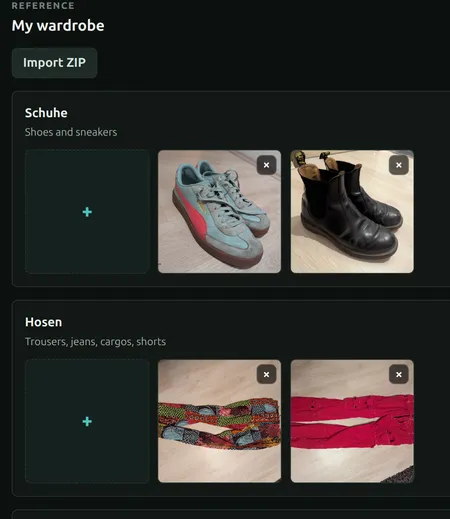
As a first step, an “observation” prompt extracts each wardrobe photo’s color palette, fabric, patterns, details, era or subculture, and a handful of useful style words.
Then, an initial taste profile is built, one for each of these categories: shoes, trousers, short-sleeve tops, mid-layers, cold-weather tops, and headwear. This is done using a stronger model (GPT-5.5 medium), which looks at all these wardrobe items’ descriptions and also gets to see a free-text note where I tried to describe my taste (which turned out to be quite hard to do).
A resulting generated judgement prompt looks something like this:
You like cold-weather pieces that feel warm, oldschool, cozy and funky: oversized chunky knit pullovers, patterned cardigans, zip-up wool blends, heavy textured sweaters, retro fleece-like layers and earthy grunge/academe-adjacent tailoring when it still feels alternative. The strongest signals are multicolor geometric, folkloric, ethno-inspired, zigzag, stripe, block, tartan or marled knit patterns; deep V-necks, ribbed cuffs and heavy woolly texture. Bright orange, teal, red, mustard, blue, magenta, green and violet are excellent, but beige/grey/black neutrals work when the knit pattern is interesting. Score up for oversized relaxed silhouettes, chunky yarn, wool blends, cozy weight, vintage 70s/80s/90s boho/grunge energy and patterns that look crafted rather than printed cheaply. Dock points for thin plain pullovers, sterile modern jackets, glossy puffers, office blazers without earthy texture, big logos, dull monotone fleeces and anything too sleek or formal to feel warm and alternative.
The judge: a local VLM running on llama.cpp
Judging is the act of rating a given Vinted listing. Since the judge will be called many thousands of times per week, and I am spending enough money on clothes already, I decided to use llama.cpp to host a small VLM on my server, which is running anyway (in the cloud, that is).
The model I am using is LiquidAI’s LFM2.5-VL-1.6B at 4-bit quantization, running in llama.cpp. If you want to learn more about how I did this and wired things up, expand the section below.
How the local model is deployed via Coolify
The model server is a separate Coolify project rather than living inside the VSniper Docker Compose. Its image builds llama-server from source, downloads the pre-quantized model from Hugging Face on first start and keeps the model cache in a persistent volume. It is deliberately configured for my rather modest CPU-only server: six inference threads, one request at a time and a limited context and image-token budget.
Separate Coolify projects would normally end up on separate Docker networks, so they couldn’t talk to each other. Both projects therefore also join Coolify’s shared external network, where the model container has a stable internal hostname. With this setup, VSniper’s worker can call the OpenAI-compatible API endpoint at http://lfm25-vl-internal:8080/v1 without me exposing it to the public internet.
What the judge prompt contains
The judge’s full prompt contains not only the category-specific taste prompt, but also:
- up to four photos from the listing,
- the title, brand, size, condition and description,
- a scoring guide on how to rate from 1 to 100,
- my manual taste note,
- and a few recent liked/disliked examples as calibration anchors.
I included the manual taste note here again, even though it was already passed when building the taste prompts, to make sure all this information (which I can attest to be useful for judging a piece of clothing) really arrives at the judge model.
What is being returned
It returns a small JSON object containing four things, enforced via structured output: an integer score from 1 to 100, a one-sentence explanation for the rating, one to four positive taste labels (short tags naming the parts of my taste that the listing matches) and up to three concerns (short tags naming whatever cost the listing points). These tags are just there to make the model’s decision-finding easier to grasp at a glance.
All these judgment results are recorded and can be reviewed in the web UI. This is what a Candidate entry looks like:
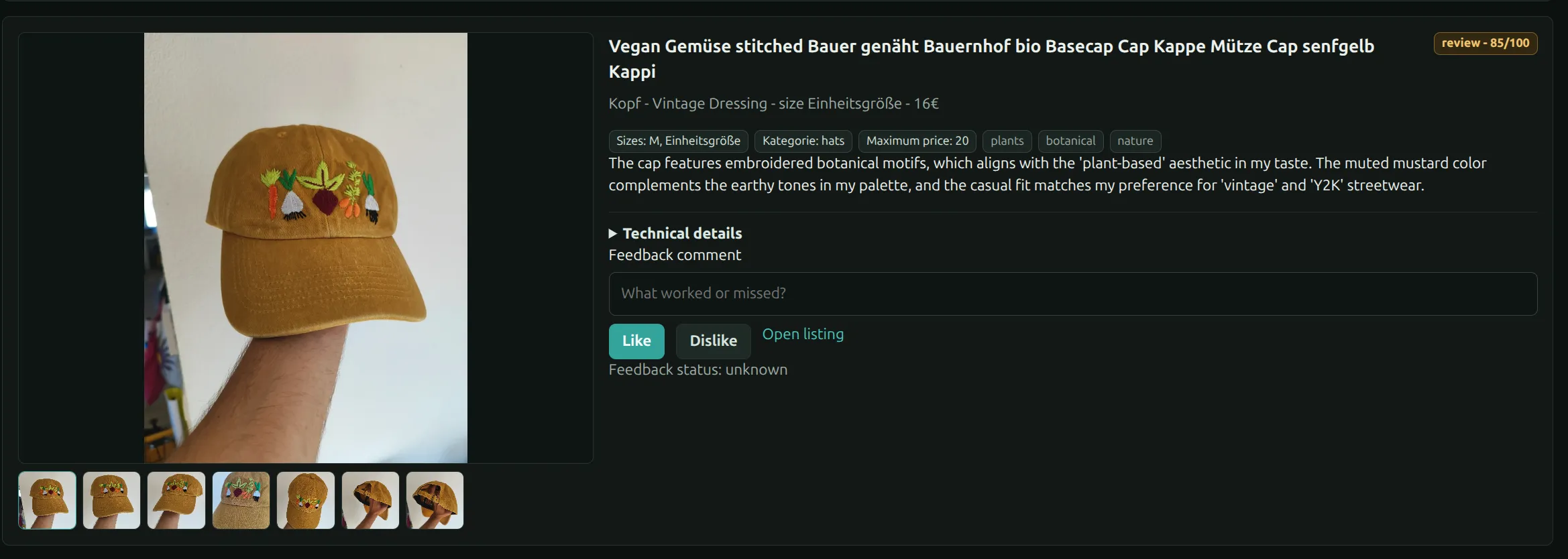
Each listing’s score is then also compared with a configurable threshold, and the listings that pass the bar get sent straight to my phone.
Telegram integration
A simple bot sends me the listing, the judge’s score and reasoning, and lets me give feedback via Like and Dislike buttons:
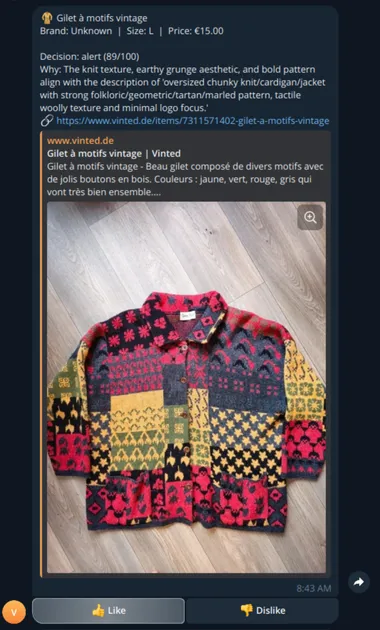
I can also just reply to a particular message, and the system will add my reply as a note for this candidate, to be used in future taste recomputations.
The bot also warns me when my Vinted credentials are about to expire. This feature was born from experience.
Updating the taste profile
When enough feedback comes in, I need to recompute the taste profile. But running it costs about $0.50, so I don’t auto-trigger this on every single new vote or note I leave.
Instead, the UI clearly shows how many new votes (positive and negative) were added since the last taste recomputation and allows me to trigger a recompute:

If this button is pressed, the system then computes observations for all the listings I liked and disliked since the last recomputation, as well as for any new wardrobe items I might have added, and finally produces an updated taste profile.
Blocking the fast-fashion brands
I also gave VSniper a list of fast-fashion brands to completely ignore. The worker simple skips it and doesn’t waste any more compute on them, since I will not be buying them anyways.
The architecture
VSniper is two Python processes and one web app:
- A FastAPI API serves the React dashboard and Telegram webhook.
- A worker scans searches, judges candidates and triggers the Telegram alerts.
- A React frontend
Both Python processes share one SQLite database in WAL mode1. Uploaded wardrobe photos and cached listing images live in normal mounted storage. There is no Redis, no Postgres and no message broker. Very unassuming.. (as opposed to my taste in clothes).
The whole thing is deployed via Docker Compose on my server, using the power of Coolify.
But.. does it work?
Yes it does! It has already surfaced plenty of clothes I really like, some of them I bought. I love the convenience of just opening Telegram whenever I feel like it and knowing that a well-curated list of clothes is waiting for me. If you want to try it out yourself, I have good news for you:
Open source
The code is open source and can be found here.
I don’t think it’s necessary to even mention these days that this was coded with a little help from my friends Claude and Codex. It does work reliably though, since I (mostly) know what I’m doing. Feel free to open up GitHub issues or pull requests if you are hitting a wall!
That’s all!
Keep dressing true to your fullest self, and maybe VSniper can be of help with that :-)
Footnotes
-
WAL (Write-Ahead Logging) is an SQLite mode where writes first go to a separate log file instead of directly into the database file. This way, readers don’t block the writer (and vice versa), which matters here because the backend and the worker use the same database at the same time. ↩